
Quickstart: creating and managing MESA grids with persephone#
This tutorial explains how to use the persephone interface to create
and manage MESA stellar models grids, including oscillation analysis
using the GYRE code.
import persephone as pph
pph.__version__
'0.1'
The grids submodule contains the functions required to create the
model grid we want to work with. In this tutorial example, we will
create a simple grid of solar-type stars, with evolution models for four
stellar masses at solar metallicity.
grid_dir = "grid_example"
pph.grids.create_grid (grid_dir, z_min=0.0134, mstar_max=1.3,
                       compile_mesa=False, verbose=False, )
MESA needs to be compiled inside each of the created model directories.
pph.grids.compile_grid (grid_dir, verbose=False)
After the compilation, the actual MESA run can be done. The MESA
instances can be launched sequentially or run in parallel, using the
parallelise and nodes arguments.
pph.grids.run_grid (grid_dir, verbose=False,
                    parallelise=True, nodes=4)
The grid is now created with all necessary directories.
Note: the steps described above could have been performed altogether through the
create_gridfunction by settingcompile_mesa=Trueandrun_mesa=True.
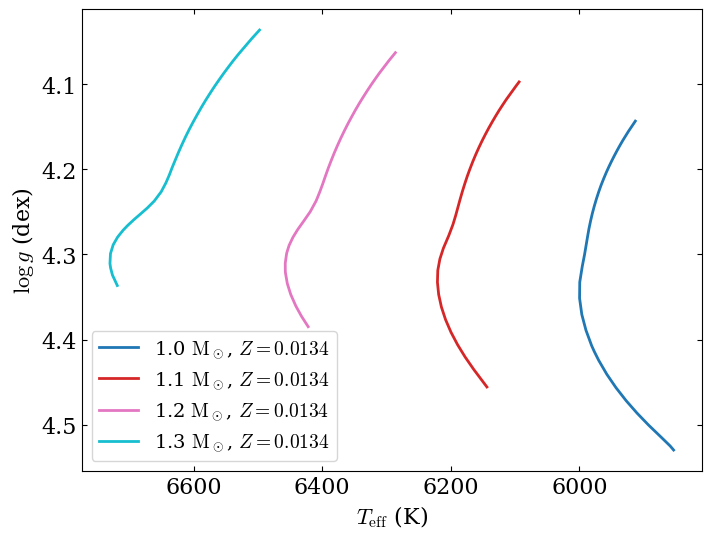
It is now possible to take a look at the evolutionary tracks of the model computed by MESA:
fig = pph.grids.plot_evolutionary_tracks (grid_dir, diagram="Kiel", figsize=(8,6),
                                          lw=2, min_age=1e8,
                                          kwargs_legend={"fontsize":14})
Running GYRE#
persephone also provides the possibility to use GYRE compute the
properties of the oscillation modes of the grid models.
pph.grids.analyse_grid_gyre (grid_dir, verbose=False,
                             parallelise=True, nodes=4)
Managing MESA input physics#
It is possible to change the default physics that MESA will use by
passing a dictionary through the parameters argument. It will be
used to build the inlist file used to run MESA. The keys of the
dictionary correspond to the namelists used by MESA in the inlist files.
To each of these keys, the user should provide a dictionary with the
state of the parameters that need to be modified. An example of
parameters dictionary to provide to the interface can be accessed
through the set_default_inlist function.
pph.grids.set_default_inlist ()
{'star_job': {'create_pre_main_sequence_model': '.true.',
  'load_saved_model': '.false.',
  'save_model_when_terminate': '.true.',
  'save_model_filename': "'final_model.mod'",
  'profile_columns_file': "'profile_columns.list'",
  'history_columns_file': "'history_columns.list'",
  'pgstar_flag': '.false.'},
 'eos': {},
 'kap': {'use_type2_opacities': '.true.', 'zbase': '0.02'},
 'controls': {'initial_mass': '1.0',
  'initial_z': '0.0134',
  'initial_y': '-1',
  'mixing_length_alpha': '2.15',
  'use_dedt_form_of_energy_eqn': '.true.',
  'use_gold_tolerances': '.true.',
  'max_num_profile_models': '50000',
  'profile_interval': '100',
  'write_pulse_data_with_profile': '.true.',
  'pulse_data_format': "'GYRE'",
  'add_atmosphere_to_pulse_data': '.true.',
  'xa_central_lower_limit_species(1)': "'h1'",
  'xa_central_lower_limit(1)': '1d-7',
  'use_ledoux_criterion': '.true.'}}
Let’s say for example that you want to include core overshooting in your
input settings. One possibility to include the required input settings
is to pass the following dictionary to the parameters argument of
create_grid. Note that the parameterisation choice of the core
overshoot is arbitrary.
parameters = {"controls": {"overshoot_scheme(:)": "'exponential'",
                           "overshoot_zone_type(:)": "'burn_H'",
                           "overshoot_zone_loc(:)": "'core'",
                           "overshoot_bdy_loc(:)": "'top'",
                           "overshoot_f(:)": "0.02d0",
                           "overshoot_f0(:)": "0.01d0"}}
You can use the set_default_inlist function to check that you inlist
file will look like what you want:
pph.grids.set_default_inlist (parameters=parameters)
{'controls': {'overshoot_scheme(:)': "'exponential'",
  'overshoot_zone_type(:)': "'burn_H'",
  'overshoot_zone_loc(:)': "'core'",
  'overshoot_bdy_loc(:)': "'top'",
  'overshoot_f(:)': '0.02d0',
  'overshoot_f0(:)': '0.01d0',
  'initial_mass': '1.0',
  'initial_z': '0.0134',
  'initial_y': '-1',
  'mixing_length_alpha': '2.15',
  'use_dedt_form_of_energy_eqn': '.true.',
  'use_gold_tolerances': '.true.',
  'max_num_profile_models': '50000',
  'profile_interval': '100',
  'write_pulse_data_with_profile': '.true.',
  'pulse_data_format': "'GYRE'",
  'add_atmosphere_to_pulse_data': '.true.',
  'xa_central_lower_limit_species(1)': "'h1'",
  'xa_central_lower_limit(1)': '1d-7',
  'use_ledoux_criterion': '.true.'},
 'star_job': {'create_pre_main_sequence_model': '.true.',
  'load_saved_model': '.false.',
  'save_model_when_terminate': '.true.',
  'save_model_filename': "'final_model.mod'",
  'profile_columns_file': "'profile_columns.list'",
  'history_columns_file': "'history_columns.list'",
  'pgstar_flag': '.false.'},
 'eos': {},
 'kap': {'use_type2_opacities': '.true.', 'zbase': '0.02'}}
We then run the grid.
grid_dir_overshoot = "grid_example_overshoot"
pph.grids.create_grid (grid_dir_overshoot, parameters=parameters,
                       compile_mesa=True, run_mesa=True,
                       mstar_max=1.3, z_min=0.0134, verbose=False,
                       parallelise=True, nodes=4)
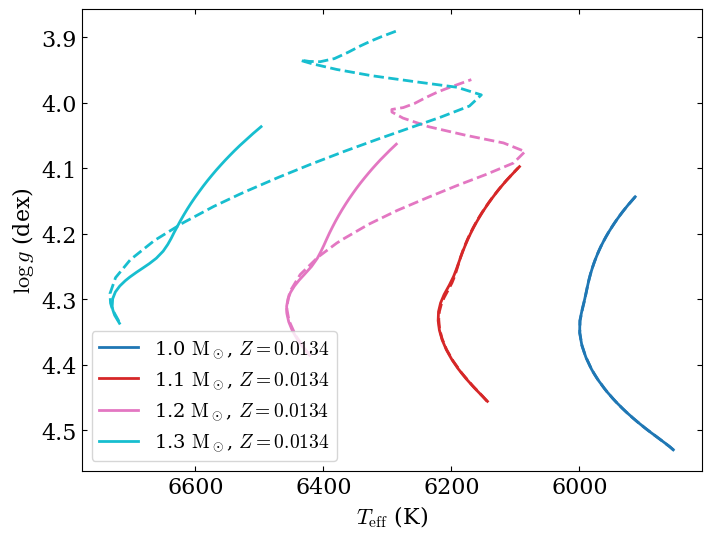
Once again, we can take a look at the evolutionary tracks and compare them to the case without overshoot:
fig = pph.grids.plot_evolutionary_tracks (grid_dir_overshoot, diagram="Kiel", figsize=(8,6),
                                          cmap="tab10", lw=2, ls='--', min_age=1e8,
                                          ax=fig.get_axes ()[0], show_legend=False)
fig
Managing GYRE configuration#
The default persephone template for GYRE is dedicated to look for
adiabatic acoustic modes (p modes) of main-sequence solar-type stars,
for degrees \(\ell=0\), \(1\), \(2\), and \(3\) . You
can easily replace this template by you own template file in order to
look for other types of modes. You just need to provide the path of the
replacement template file to the template_file argument of
analyse_grid_gyre. The file (model namelist) and
summary_file (ad_output namelist) should be omitted from the
template file as they will be automatically filled by persephone.